React Unit Testing
The unit test simply means that we have to verify the individual and isolated parts work as expected. This can be a component, helper functions, or hooks that we heavily relied on.
For this guide, we will be using these two library:
- Jest - javascript testing framework
- React Testing Library - a set of helpers that let us test React components without relying on their implementation details.
Setup
- We will be using codesandbox for a quick demo
-
Click here to spin up a react project
-
Add these devDependencies
jest@testing-library/jest-dom@testing-library/react
-
Create a file
index.test.jsinsidesrcfolder and add thisimport React from "react"; import { render } from "@testing-library/react"; import "@testing-library/jest-dom"; // we need this to interact with dom import App from "./App"; test("should render App", () => { const { container } = render(<App />); expect(container).toHaveTextContent("Hello CodeSandbox"); }); -
Click the
Teststab and click play, you should see something like this.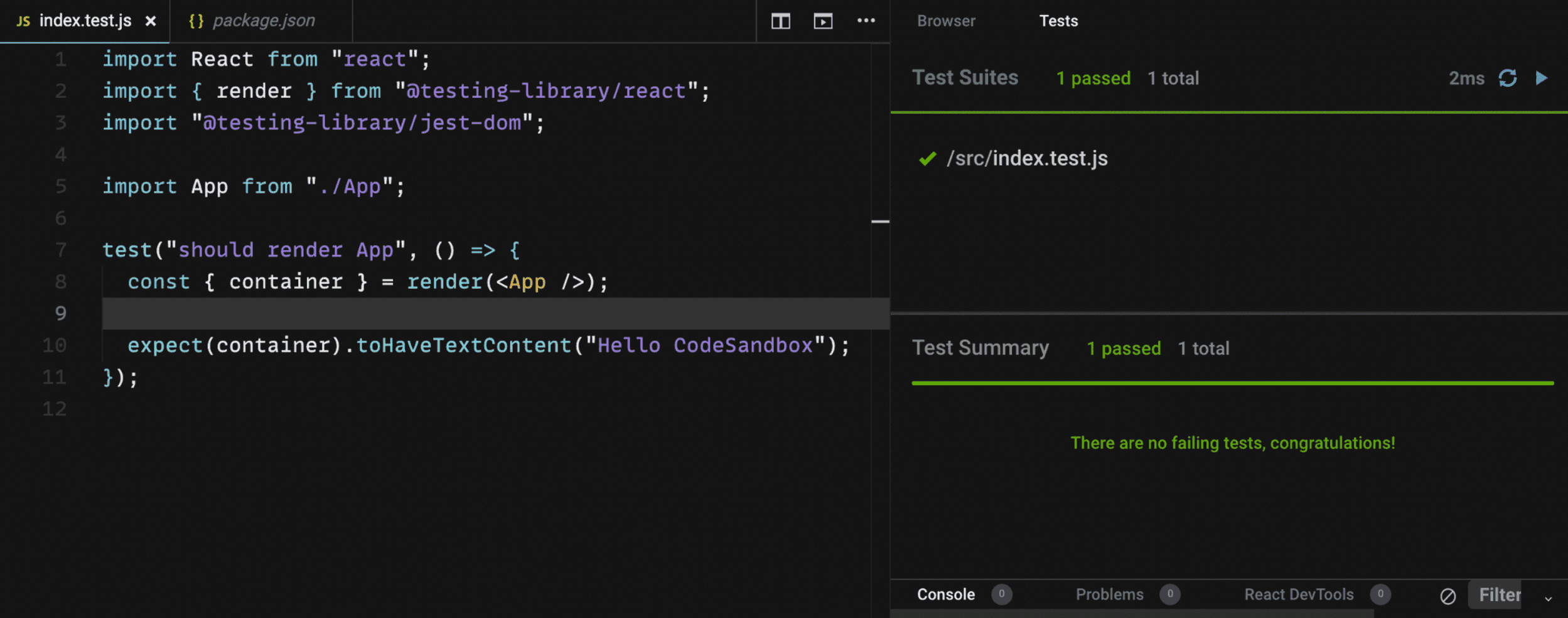
Congrats 🎉 you made your first test, and it passed!
So recap
-
We use
renderfrom testing-library to render our component -
We imported the
jest-domto simulates a DOM environment, and provides a set of custom jest matchers that we can use to extend jest. For this use case, we use thetoHaveTextContexton our assertion to check if there is a text content with"Hello CodeSandbox"string.The rest of the custom matchers is can be seen here.
Example 1: With Jest Mock Function
Final version https://github.com/mharrvic/unit-test/tree/jest-fetch-mock
Why do we need to mock?
In a unit test, mock objects can simulate the behavior of complex, real objects and are therefore useful when a real object is impractical or impossible to incorporate into a unit test.
When do we need to use mock?
- mock API calls
- mock databases queries
- mock conditions difficult to generate in a test environment
Setup
- Setup CRA with jest
npx create-react-app unit-test
cd unit-test-
Create
utilsfolder andadd api-client.jsundersrcfolder -
Create
Contributions.jsfile undersrcfolderimport React from "react"; import { client } from "./utils/api-client"; function ContributorProfile({ total, avatar, username }) { return ( <div data-testid="contributor" className="contributor"> <div className="profile"> <img src={avatar} width="60px" alt={username} /> <p>{username}</p> </div> <div className="total"> <p className="number">{total}</p> commits </div> </div> ); } function Loading() { return ( <div aria-label="loading"> <p>loading</p> </div> ); } export default function FetchContributors() { const [contributors, setContributors] = React.useState({}); const [status, setStatus] = React.useState("idle"); const fetchContributors = async () => { setStatus("loading"); client("stats/contributors") .then((data) => data.map(({ total, author }) => ({ total: total, username: author.login, avatar: author.avatar_url, id: author.id, })) ) .then((contributorList) => { setContributors({ contributorList }); setStatus("success"); }); }; return ( <div> <button onClick={fetchContributors}>Fetch contributors</button> <> {status === "loading" && <Loading />} {status === "success" && ( <div data-testid="contributors" className="contributors"> {contributors.contributorList.map((contributor) => { return ( <ContributorProfile key={contributor.id} {...contributor} /> ); })} </div> )} </> </div> ); } -
Add the
Contributorscomponent toApp.jsimport "./App.css"; import Contributors from "./Contributors"; function App() { return ( <div className="App"> <Contributors /> </div> ); } export default App; -
Create
__tests__folder and addfetch-contributor.test.jsimport "@testing-library/jest-dom"; import { fireEvent, render, screen, waitFor, waitForElementToBeRemoved, } from "@testing-library/react"; import React from "react"; import Contributors from "../Contributors"; beforeAll(() => jest.spyOn(window, "fetch")); test("should render with mock fetch", async () => { render(<Contributors />); window.fetch.mockResolvedValueOnce({ ok: true, json: () => { return [ { total: 59, author: { login: "red", id: 1234, avatar_url: "https://avatars2.githubusercontent.com/u/1234?v=4", }, }, { total: 122, author: { login: "leo", id: 4567, avatar_url: "https://avatars2.githubusercontent.com/u/4567?v=4", }, }, ]; }, }); const fetchButton = screen.getByText("Fetch contributors"); fireEvent.click(fetchButton); await waitForElementToBeRemoved(() => screen.getByLabelText(/loading/i)); await waitFor(() => screen.getAllByTestId("contributor")); expect(fetch).toHaveBeenCalledTimes(1); const contributors = screen.getAllByTestId("contributor"); expect(contributors).toHaveLength(2); expect(contributors[0]).toHaveTextContent("red"); expect(contributors[0]).toHaveTextContent("59"); expect(contributors[1]).toHaveTextContent("leo"); expect(contributors[1]).toHaveTextContent("122"); });- Add
jest.spyOnthat creates a mock and track calls on ourfetchAPI on beforeAll (will trigger on before executing each test) - We added the
mockResolvedValueOnceto mock our result once resolved - With the following test interaction, by clicking the
Fetch contributionsbutton to triggerfetch - We use the
waitForElementToBeRemovedto wait for the loading to be removed on the DOM, and then waiting forgetAllByTestIdsince we addedcontributoras test-id on the mapped result - Asserts on the expected results
- Add
-
Run
yarn testto execute the test
Example 2: With Mock Service Worker(MSW)
Final Version: https://github.com/mharrvic/unit-test/tree/jest-msw
Mock by intercepting requests on the network level. Seamlessly reuse the same mock definition for testing, development, and debugging.
When to use MSW?
Kent C. Dodds published this blog about Stop mocking fetch, which he explains mocking things like fetch is that you end up re-implementing your entire backend, on every test.
Setup (We will going to continue on our progress on example 1)
-
Add
mswdependencyyarn add msw -
Create a
testfolder undersrcand add thisimport { rest } from "msw"; import { setupServer } from "msw/node"; import { apiURL } from "../utils/api-client"; const handlers = [ rest.get(`${apiURL}/stats/contributors`, async (_, res, ctx) => { return res( ctx.json([ { total: 59, author: { login: "red", id: 1234, avatar_url: "https://avatars2.githubusercontent.com/u/1234?v=4", }, }, { total: 122, author: { login: "leo", id: 4567, avatar_url: "https://avatars2.githubusercontent.com/u/4567?v=4", }, }, ]) ); }), ]; const server = setupServer(...handlers); export * from "msw"; export { server }; -
Open the
setupTest.jsand add this underimport "@testing-library/jest-dom";import { server } from "./test/test-server"; beforeAll(() => server.listen()); afterAll(() => server.close()); afterEach(() => server.resetHandlers());This will be trigger on every test. The
MSWneeds tolisten()on every before the test,close()the connection on after all the test, andresetHandlers()on every after each test. -
For us to test if the
MSWsetup is working fine, create amsw-server.test.jsunder__tests__folder and add thisimport { server, rest } from "../test/test-server"; import { client, apiURL } from "../utils/api-client"; test("makes GET requests to the given endpoint", async () => { const endpoint = "test-endpoint"; const mockResult = { mockValue: "VALUE" }; server.use( rest.get(`${apiURL}/${endpoint}`, async (_, res, ctx) => { return res(ctx.json(mockResult)); }) ); const result = await client(endpoint); expect(result).toEqual(mockResult); });Run
yarn testto see if it pass, you can playaround with the results -
Next we will going recreate the
fetch mockingimplementation on example 1 by using MSWCreate a
msw-contributor.test.jsunder__tests__folder and add thisimport "@testing-library/jest-dom"; import { fireEvent, render, screen, waitFor, waitForElementToBeRemoved, } from "@testing-library/react"; import React from "react"; import Contributors from "../Contributors"; test("using msw", async () => { render(<Contributors />); const fetchButton = screen.getByText("Fetch contributors"); fireEvent.click(fetchButton); await waitForElementToBeRemoved(() => [ ...screen.queryAllByLabelText(/loading/i), ...screen.queryAllByText(/loading/i), ]); await waitFor(() => screen.getAllByTestId("contributor")); const contributors = screen.getAllByTestId("contributor"); expect(contributors).toHaveLength(2); expect(contributors[0]).toHaveTextContent("red"); expect(contributors[0]).toHaveTextContent("59"); expect(contributors[1]).toHaveTextContent("leo"); expect(contributors[1]).toHaveTextContent("122"); });Looks clean right?
Under the hood, when the test triggers a click event, MSW intercepts the request and returned our defined output on our
test-server.jswith the/stats/contributorsendpoint.
Resources
https://pawelgrzybek.com/mocking-functions-and-modules-with-jest/
https://en.wikipedia.org/wiki/Mock_object
https://www.richardkotze.com/coding/react-testing-library-jest
https://kentcdodds.com/blog/stop-mocking-fetch
https://medium.com/@rickhanlonii/understanding-jest-mocks-f0046c68e53c